Clay
Impressions
-
Amazing library.
-
What Clay offers :
-
"Buttons".
-
Nothing more than any ordinary element that uses hover checks and pointer input detection functions.
-
-
"Tabs"
-
Nothing more than buttons that change what will be rendered.
-
-
Container system and nested elements.
-
Context menus.
-
-
Automatic alignment of elements/text.
-
Scrollers.
-
Capturing system, although basic and limited to the pointer.
-
Advanced drawing:
-
Rounded-corner rectangles.
-
Dividers.
-
-
-
What is missing :
-
Text input.
-
Any high-level widget:
-
Drag and Drop.
-
Window dragging.
-
External windows support.
-
Tiling.
-
Check buttons.
-
Sliders.
-
Texture Progress.
-
Video Players.
-
Color Picker.
-
Nine-patch texture.
-
-
-
Should I use it right now?
-
The library for me has:
-
A very nice container system.
-
An okay hover / button system.
-
A pleasant web-style drawing system.
-
-
However, the things the library offers are WELL outside what I actually need right now.
-
It is certainly a good library for containers, and sounds like a good framework for building sites when you don't want to use HTML/CSS frontend, but that's mostly it.
-
IF / WHEN I work on something like that, then it makes sense to use the library.
-
But, considering the UI needs in games, in the end Clay is only useful if it actually helps. There's no strong reason to RUSH implementing it.
-
The reality is that NOTHING would change in my game by using Clay. There is no new visual feature or functionality.
-
It would only be a convenience to have a solid library that provides container functionality.
-
That's it.
-
-
In the future, I'll for sure go for it, but not now.
-
About
-
Layout engine.
-
It's an ImGUI in C, renderer-agnostic.
-
Clay .
-
Bindings .
-
(2025-06-24) Cpp, Csharp, Odin, Rust, Zig.
-
-
-
Very well presented.
-
-
-
Tree.
-
Parent.
-
Child array.
-
"Reverse Breadth-first search".
-
In this case, when leaving the scope, calling
CloseElement()this happens "accidentally". -
In
CloseElement()the children's properties are defined so that when the parent is reached it already has all child information to define its own properties.
-
-
-
The video explains all the passes below very well.
-
Full Layout Pass:
-
 .
.
-
The alignment part is handled together with Positions.
-
-
Final code:
-
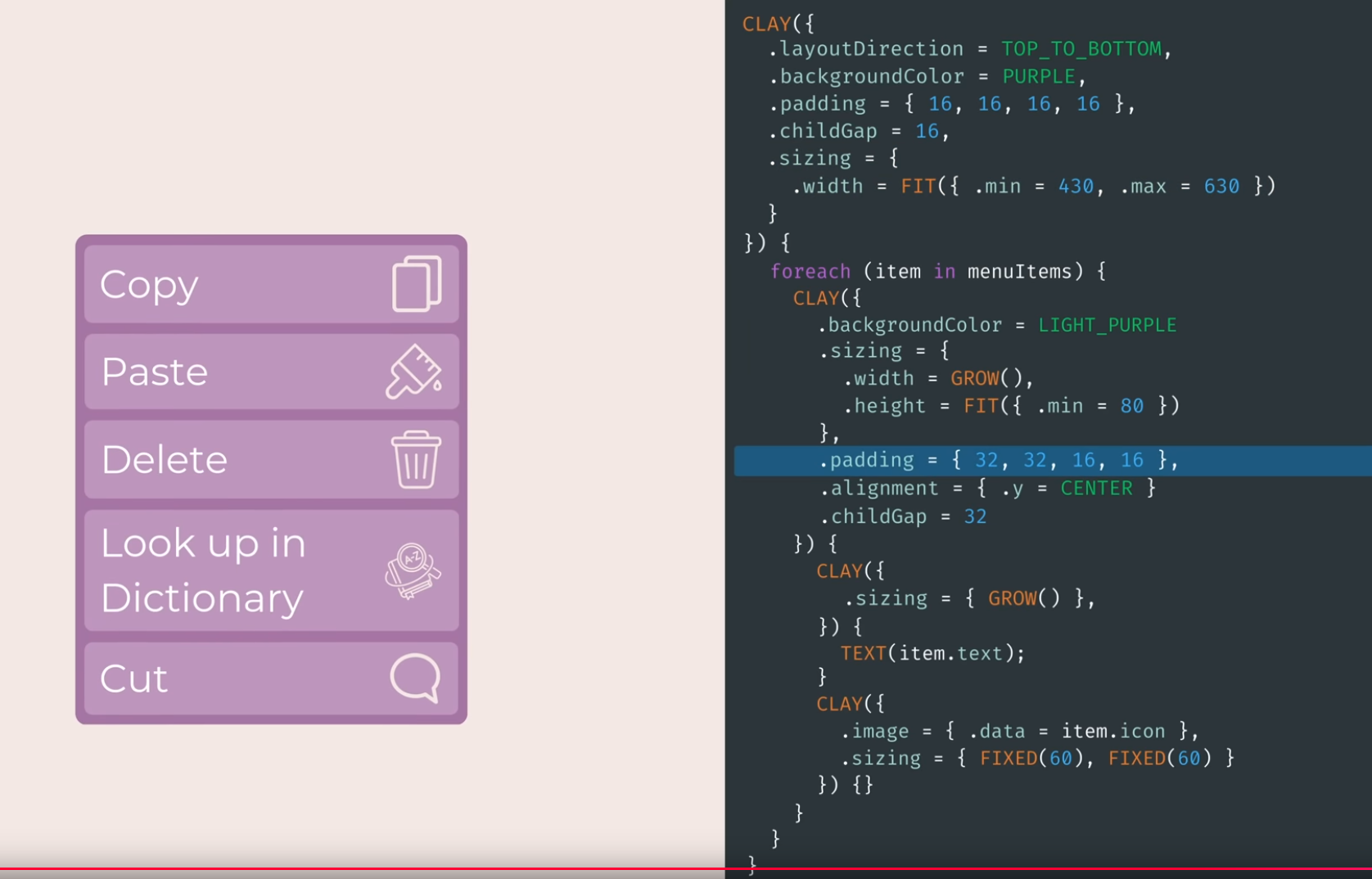 .
.
-
-
-
-
Pressing
don the page opens the debugger. -
Nice.
-
Key Detection / Click / Hover / Capturing
-
Limitations :
-
Capturing only works for the Pointer; the Pointer can be anything, not necessarily MB1.
-
-
Capturing :
PointerCaptureMode :: enum EnumBackingType { Capture, Passthrough, }-
The only place this is used is via the
CLAYmacro during element creation. -
This is the only place in the entire binding that references capturing.
-
Capturing captures or ignores, plain and simple, right?
-
I'm unsure if
passthroughis equivalent topass (propagate up)orstopas in Godot. -
Ideally it's the
stopoption. I findpasskind of odd, although it may have some uses in some circumstances.
-
-
-
To know if a button is pressed or hovered, it's all done through the
OnHovercallback. -
A
PointerDatais received containing position info andPointerDataInteractionState. -
By default more "attention" is given to the left click than to any other input.
-
SetPointerState(pos, pointerDown)technically allows "anything" as a pointer. -
So, technically any input is supported as long as the check is done:
my_hover_callback :: proc(etc, pointer_data, etc) { if pointer_data.state.PressedThisFrame { // do something } // Or simply: if rl.IsMouseButtonPressed(.LEFT) || rl.IsMouseButtonPressed(.RIGHT) || rl.IsKeyPressed(.A) { // do something } }-
If you choose to ignore the pointer state information, you will thus ignore Clay's whole input capturing system.
-
In some moments that's fine, but sometimes this becomes a limitation of Clay: capturing only works for Pointer input, nothing else, because that's the only information passed to Clay.
-
-
Support
-
Wasm support: compile with clang to a 15kb uncompressed .wasm file for use in the browser
Render
-
Renderer-agnostic: outputs a sorted list of rendering primitives that can be easily composited in any 3D engine, and even compiled to HTML (examples provided).
-
"How does clay render fonts in RayLib? is it a solution for font rendering?"
-
Nope, never. Clay with RayLib renders fonts using RayLib calls
rl.DrawTextEx(), nothing else.
-
Odin Bindings
-
Main difference:
// C form of element macros // Define an element with 16px of x and y padding CLAY({ .id = CLAY_ID("Outer"), .layout = { .padding = CLAY_PADDING_ALL(16) } }) { // Child elements here } // Odin form of element macros if clay.UI()({ id = clay.ID("Outer"), layout = { padding = clay.PaddingAll(16) }}) { // Child elements here } -
The macro
CLAYis replaced byif clay.UI(). -
I personally find this a bit goofy.
-
This works due to the use of
@deferred, calling another function when leaving the scope:_OpenElement :: proc() --- _CloseElement :: proc() --- _ConfigureOpenElement :: proc(config: ElementDeclaration) --- ConfigureOpenElement :: proc(config: ElementDeclaration) -> bool { _ConfigureOpenElement(config) return true } @(deferred_none = _CloseElement) UI :: proc() -> proc (config: ElementDeclaration) -> bool { _OpenElement() return ConfigureOpenElement } -
Renderers with bindings :
-
(2025-06-25)
-
At the moment, only RayLib exists.
-
No Sokol, SDL2 or SDL3.
-
-
Question
// Odin form of element macros
if clay.UI()({ id = clay.ID("Outer"), layout = { padding = clay.PaddingAll(16) }}) {
    // Child elements here
}
-
It's so that a struct literal for the second call is evaluated after the element is opened, so you can do stuff like
if clay.UI()({
    backgroundColor = GRAY if clay.Hovered() else BLACK,
    }) {
      // ...
}
-
and the
clay.Hovered()will be evaluated in the context of the newly-opened element rather than in the context of the parent element (edited)Wednesday, 22 October 2025 09:40